Apps
Purpose-built tools that bring greater clarity to releases, work, and delivery. Explore RGBIQ Release Views for Jira, our first app, now submitted for Atlassian Marketplace review.
Explore our apps
A clearer picture of work
Work is already happening in Jira.
We help you see what matters.
RGBIQ builds focused apps and tailored solutions that help teams get more value from Jira.
01 / How we help
Start with a tool built for a shared challenge, or work with us on something specific to your team.
Purpose-built tools that bring greater clarity to releases, work, and delivery. Explore RGBIQ Release Views for Jira, our first app, now submitted for Atlassian Marketplace review.
Explore our appsHave a challenge your current tools don’t solve? We help you understand the problem, shape a practical approach, and build custom Jira apps around your team’s needs.
Explore custom solutions02 / Cross-project Jira release reporting
Bring releases, work items, and linked issue details into one place for your team’s release review.
Create your own release views. Group multiple versions across spaces into Release Sets. See release progress, work items, linked issues, approvals, release readiness, and more.
A 30-day Marketplace trial will be available at launch.
Get launch updates.
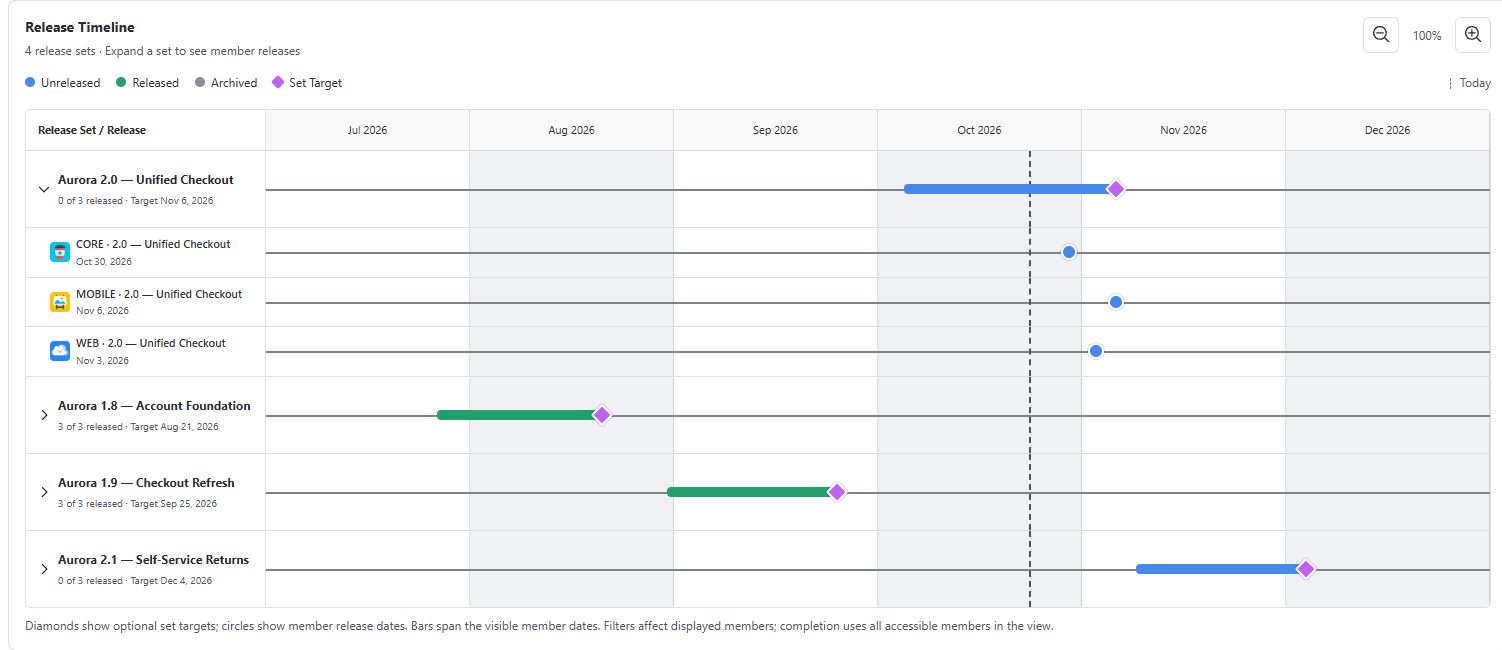
Group Jira versions into Release Sets for a launch. See member releases, dates, and a shared target in one view.
 View full screenshot
Show linked issues like test cases or change tickets right beside your release work items. Fully customize columns and filters to easily see release readiness.
 View full screenshot
Customize charts, columns, and views. Track release progress, status, and approvals in one place.
 View full screenshot
Follow epics, stories, and sub-tasks. Review testing workflow status alongside commit and pull request summaries available in Jira. Focus the conversation on the work that needs follow-up.
See it in action
Watch the overview or follow a complete release review. Press play to start either demo.
A quick look at cross-project releases, Release Sets, and linked issue details.
00:00:00 Your releases. The full picture.
RGBIQ Release Views for Jira
00:00:04 Jira releases. One clear view.
See release progress, status, and approvals together.
00:00:12 Several projects. One launch.
Group versions across spaces into Release Sets.
00:00:21 Show linked issues in detail
See test cases and change tickets beside your release work.
00:00:32 Make the report your own
Customize charts, columns, filters, and saved views.
00:00:41 Your releases. The full picture.
RGBIQ Release Views for Jira
On-screen opening and closing: RGBIQ Release Views for Jira. Try it for free. 30-day free trial on Atlassian Marketplace.
Create a view, explore the timeline, adjust columns, and inspect hierarchy and linked work.
00:00:00 Your releases. The full picture.
Jira releases across projects. One clear view. Meet RGBIQ Release Views for Jira.
00:00:08 Start with a focused release view
Aurora's launch spans Web, Mobile, and Platform. Saved views let you choose Jira spaces, specific releases, or JQL, and return to a focused report.
00:00:19 Review progress, status, and approvals
The Releases report brings native versions together. Review status, dates, approvals, and work progress. Column filters focus both the table and its supporting charts.
00:00:31 Group versions into Release Sets
Release Sets group versions from several spaces into one named launch. Expand Unified Checkout to compare its three member releases, their dates, and their progress.
00:00:41 See the dates in context
On the timeline, expand the set to see each member's date. The diamond marks the optional launch target. Grouping does not change or synchronize Jira version dates.
00:00:52 Shape the work-item table
In Work Items, scroll through the detail. Widen a column, collapse what you don't need, or configure the layout. Your column sizes stay personal.
00:01:03 Follow the hierarchy
Here, the Unified Checkout epic contains stories and sub-tasks. Child rows use your configured columns, including children that have no release assignment of their own.
00:01:13 Show linked issues in detail
Expand linked items to show test cases, change tickets, and other linked work beside the source item. Choose separate columns for each side. Work items without links remain in the report.
00:01:25 Bring readiness signals together
Review testing workflow status alongside development summaries available in Jira. This demo includes an open pull request, a merged pull request, and a commit. Summaries depend on Jira's connected tools and available data.
00:01:39 Measure progress your team's way
Configure release columns and choose a progress measure: Work Item Count, Story Points, or Original Estimate versus Remaining Estimate. Customize charts and save the view for your team's next review.
00:01:51 Focus the release review
Needs Attention surfaces overdue releases, missing dates, and approval follow-ups. Filter the report and export the results to CSV for the conversations that move a release forward.
00:02:02 Your releases. The full picture.
Create your own release views. Explore RGBIQ Release Views for Jira at RGBIQ dot com.
On-screen opening and closing: RGBIQ Release Views for Jira. Try it for free. 30-day free trial on Atlassian Marketplace.
Real app recordings with synthetic demo data, edited for pace. The product tour uses AI-generated narration. Testing and development summaries depend on the information available in Jira. Trial access opens after Marketplace approval.
Built on Atlassian Forge. Each viewer’s Jira permissions apply. Customize charts, columns, and saved views, then export filtered reports to CSV.
03 / Custom Apps & Consulting
When your team needs something more specific, we bring app development and a fresh perspective to the way you work in Jira.
Talk through your goals, current workflow, and where things get difficult.
Agree on what would help, the scope of the work, and a sensible first step.
Develop the solution, review it together, and refine it around real use.
You don’t need a finished brief. Tell us what your team is trying to do and what’s getting in the way.
04 / Our approach
Whether it’s an app or a custom project, useful software starts with a specific problem—and makes everyday work easier to understand.
Build for real gaps in everyday workflows. Keep the scope practical and the experience straightforward.
Bring better perspectives to the systems teams already use, starting with native Jira data.
Help delivery teams and stakeholders see the work, ask better questions, and share a clearer picture.
05 / About RGBIQ
RGBIQ is an independent software publisher and a partner for custom Jira apps and consulting.
We build practical tools for work visibility and delivery insight, from focused apps to solutions shaped around a team’s needs. Our first app, RGBIQ Release Views for Jira, is built on Atlassian Forge and designed to keep native Jira data at the center.
RGBIQ is operated by RGB Brands LLC.
Let’s talk
Ask about an app or tell us about your next project.
We’d love to hear what your team needs.